Note
Go to the end to download the full example code or to run this example in your browser via Binder.
4. Description-based simulation#
In lesson 3 the events were generated by the layout. They can also come from an existing sequence: a Pulseq file written with another tool, or the sequence description a scanner streams during acquisition. This lesson simulates such descriptions directly, without restating the sequence parameters.
Learning objectives
Inspect a sequence description: events, timestamps and RF definitions.
Simulate a description with
from_description, and understand the role of the handlers.Simulate a Pulseq file with
from_pulseq.
Previous: 3. Custom signal model. Next: 5. Custom operator, which adds a custom preparation and readout.

Sequence description#
A sequence description (SequenceDescription) lists the
events of one repetition: RF pulses, ADC windows and waits, each with its
timestamp and parameters (flip angle, phase, RF definition). It is the input
of every simulation.
The default description of a simulator is generated by its layout from the
sequence parameters, and describe returns it. For the 60-degree FSE of
lesson 1:
import torch

from blochsim.simulators import FSESimulator

fse = FSESimulator(ESP=5.0, TR=3000.0)
flip = torch.full((48,), 60.0)

description = fse.describe(flip=flip, ESP=5.0, TR=3000.0)
print(f"{len(description.events)} events, {len(description.adc_events)} readouts")
145 events, 48 readouts
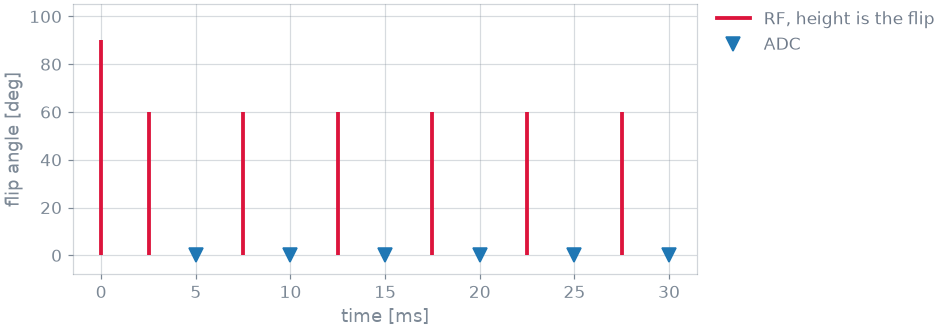
The first 30 ms show the excitation and the refocusing pulses centred between readouts. The description contains no gradients: the scanner stream does not carry them, and blochsim does not read them from a Pulseq file.
Simulation from a description#
from_description constructs a simulator from a description, bypassing
the layout. Only tissue properties and simulation settings are passed:
from_events = FSESimulator.from_description(description, states=48, T1=1000.0, T2=80.0)
signal = from_events.simulate()
The handlers of the class are still used: they play each event and define
the dephasing between events, which the description does not specify.
FSESimulator places crushers around each refocusing pulse. The same
events played with MRFSimulator, whose readout
applies one unit of dephasing after each sample, describe a different
sequence:
from blochsim.simulators import MRFSimulator

as_mrf = MRFSimulator.from_description(description, states=48, T1=1000.0, T2=80.0)
wrong = as_mrf.simulate()
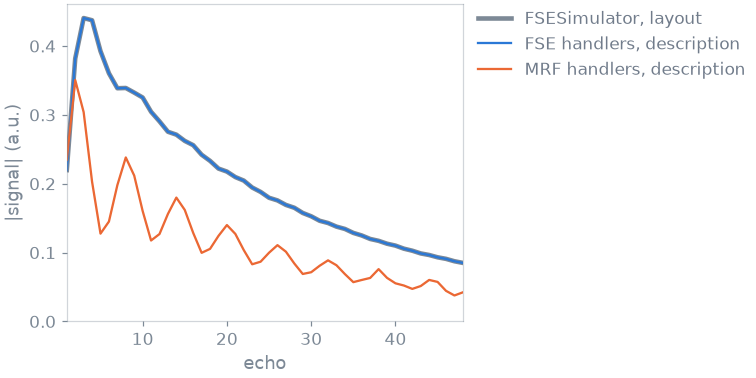
With the FSE handlers the result matches the shipped simulator up to a small
offset: FSESimulator also applies the T1 recovery between trains, which is
not an event and is therefore absent from the description. With the MRF
handlers the CPMG condition is not met and the echo amplitudes oscillate and
decay. The class therefore specifies how the events are to be interpreted.
Scanner stream#
During acquisition, pulserver streams the description of the running
sequence with the raw data. read_mrd_description() reads it
from an MRD stream, and from_description simulates it as above. A
reconstruction can thus simulate the sequence that was actually played.
Pulseq file#
from_pulseq reads the description from a .seq file, parsed by
pypulseq. The file below is a short FSE:
from_file = FSESimulator.from_pulseq(SEQ_FILE, states=20)
file_signal = from_file.simulate(T1=1000.0, T2=torch.tensor([80.0, 110.0]))
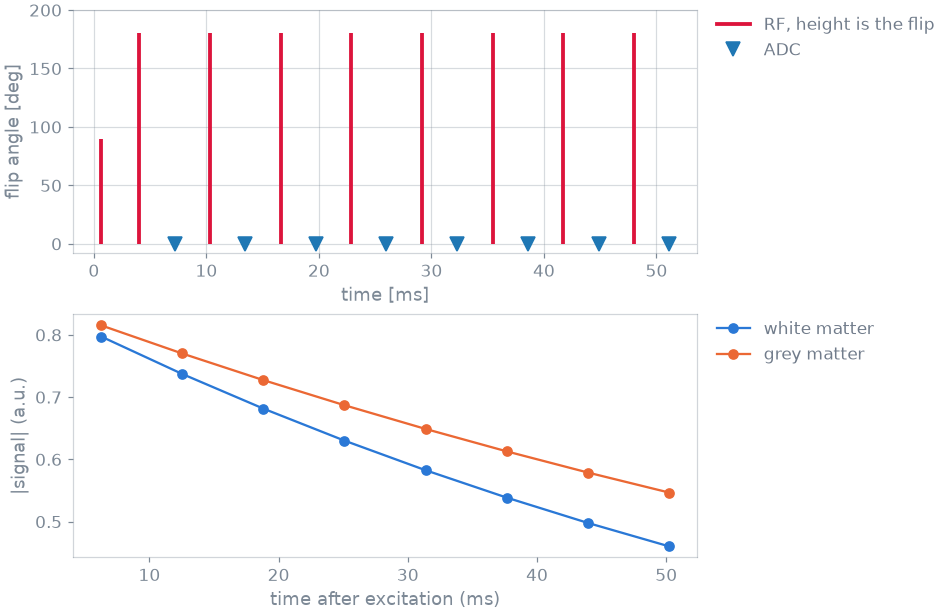
8 echoes, 6.3 ms apart
Echo spacing, echo train length, refocusing angle and RF shapes are read from the file; only the tissue and the handler class are specified.
The number of blocks per repetition is taken from the TRSize definition
of the file. Each readout is timestamped at the sample where the trajectory
crosses the k-space centre, i.e. at the echo time.
Specification#
What this lesson did, stated the way you would ask an agent for it:
With blochsim, read the sequence in fse.seq with FSESimulator.from_pulseq
and simulate it in white matter and grey matter (T1 1 s; T2 80 and
110 ms). Plot the events of one repetition and the signal at each echo
time. Separately, take the description of a 48-echo, 60-degree FSE and
simulate it with the FSE handlers and with the MRF handlers, to show that
the handlers decide what happens between the events.
Total running time of the script: (0 minutes 2.436 seconds)
